
AI agents handle daily tasks and IBM and Red Hat invest billions in open source software security.
Open Channels FM: Open Stacks, Federation, and the Changing Landscape of Software
Hosts Robert Jacobi and Dave Lockie have a conversation about AI impacts, open source priorities, data privacy, and emerging alternative network technologies
How to Accept Deposits and Partial Payments in WordPress (No WooCommerce)
Learn how to collect a deposit now and the balance later on your WordPress site with Stripe and WP Full Pay. No WooCommerce, no code, no chasing invoices!
The post How to Accept Deposits and Partial Payments in WordPress (No WooCommerce) appeared first on Themeisle Blog.
Open Channels FM: Introducing Open Source Champions
A new way to back Open Channels FM and put your voice into the conversation — not a sponsorship, a statement of support with real presence on the network.
Gutenberg Times: The WordPress 7.2 release squad, WordCamp World, Playground meets WebMCP, and more—Weekend Edition 376
Howdy,
If you’re a regular reader, you might be wondering why I’m in your inbox instead of Birgit. She’s off on a well-earned three-month sabbatical and handed over editorial duties to me while she’s away. The one change: for the next few months, the Weekend Edition will arrive every two weeks or so instead of every week.
And what a week in the WordPress world to begin!
I’d been writing this intro in my head over and over since Birgit’s handoff. Needless to say, that version got thrown out the window over the past few days. Automattic CEO Matt Mullenweg was placed on a paid leave of absence by the company’s board, and two days later was back in control.
As an Automattic employee, I’d be lying if I said I wasn’t feeling a range of emotions about the shifts in the company. I cannot talk about internal company conversations, but I can’t exactly avoid the biggest news in the WordPress world, either.
So, for my first Weekend Edition, I want to offer my support to Matt, my fellow Automatticians, and the people in the WordPress community. I’m just as passionate about the WordPress project today as I’ve ever been. Neither the core philosophy of democratizing publishing nor our principles around free software have changed. The only thing we can do is push forward and keep building a tool that so many people’s lives and businesses rely on.
With that, let’s get down to the latest news.
WordPress 7.1.1 is on track for Thursday, September 17. It’s a bug-fix release, so if you maintain anything built on 7.1’s newer features, grab the release candidate and give it a spin before then. More on that below.
On the community side, WordPress News shared the story of students in Bangladesh who built 108 websites in two weeks, along with free workshops from Uganda to Costa Rica.
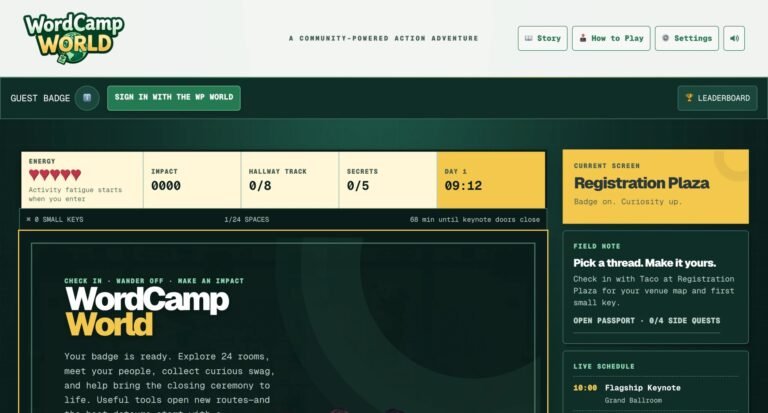
And if you need a break this weekend, WordCamp World is an unofficial pixel-art adventure set at a fictional flagship WordCamp, complete with a Contributor Day and a closing ceremony. The game was released by The WP World, an independent community project run by Marcus Burnette. Jonathan Bossenger took it for a spin in his latest stream.

Have fun this weekend and enjoy life!
Your friendly WordPress developer advocate,
Justin Tadlock
Developing Gutenberg and WordPress
Finding the inserter on some block selections has been a small, constant annoyance, and Gutenberg 23.9 finally fixes that. The what’s new in Gutenberg 23.9 post leads with inserting blocks straight from the block toolbar. Global Styles also gets dot indicators for blocks with custom style overrides, plus a filter to show only those blocks. Theme authors get separate vertical and horizontal gap control for the Group block, theme.json styling for <label> elements, Global Styles controls for citations, inputs, and selects, and custom Duotone colors.
WordPress 7.1.1 RC1 is out, with the final release scheduled for Thursday, September 17. It’s a bug-fix-only maintenance release covering 16 Core tickets and 22 Gutenberg pull requests, all for issues that surfaced during the 7.1 cycle or were deferred at the end of it. Adam Silverstein, Adrian Duffell, and Andra Ganescu are co-leading, and the 7.1.1 release schedule has the details. If you maintain anything that leans on responsive styles, the Icon Registration API, or the iframed editor, test the RC now.
On the Developer Blog, I rounded up what’s new for developers (September 2026). The consistent theme this month is things that already existed have become more declarable, documented, or schema-valid. You’ll find blocks declaring their own keyboard shortcuts through variations and transforms, theme.json schema fixes so valid responsive styles stop showing up as errors, and schema support for PHP-only blocks.
Contributors, check your local setup. As of September 8, trunk in both wordpress-develop and gutenberg requires Node.js 24 and npm 11. Manzoor Wani shared the specifics: the minimums are Node.js 24.18.0 and npm 11.16.0, and the required CI checks now run on Node.js 24. If you have a pull request based on an older trunk, rebase it to pick up those checks. Older branches keep their previous requirements.
On the road to WordPress 7.2
The 7.2 cycle is officially underway. Jeffrey Paul announced the WordPress 7.2 release squad, with Matt Mullenweg as release lead, David Baumwald on release coordination, and George Mamadashvili and Peter Wilson as tech leads. Theme folks will want to note the default theme leads: Henrique Iamarino on design, and Maggie Cabrera and Carolina Nymark on development. Beta 1 is scheduled for October 20–22, with the final release set for December 8–10. Jb Audras also posted the bug scrub schedule for 7.2 if you want to pitch in.
Notes has grown a lot since WordPress 6.9, picking up @mentions, rich text, and the ability to resolve and respond along the way. Anne McCarthy explains where it stands: “Notes are hard to discover, cumbersome to use, and tricky to track where and when they are left.” Her plan for elevating and refining the WordPress Notes feature aims to fix that by 7.2 Beta 1. It calls for a more visible spot in the block toolbar, a suggestion mode, Notes open alongside the Settings sidebar, and emoji reactions. If your clients or editorial team use Notes, now’s a good time to weigh in.
Icon fonts have had a good run but are feeling very dated in 2026. Joen Asmussen makes the case for replacing Dashicons in the admin bar and menu with SVG icons rendered through wp_get_icon(), which was introduced in WordPress 7.1. Screen readers handle icon fonts inconsistently, and they don’t render properly in Windows High Contrast Mode. SVGs with aria-label and currentColor behave predictably. A couple of design questions are still open, including whether the Posts icon becomes a quill pen. Block developers, take note of the follow-up: future work to let block.json icon registration use WordPress icons instead of Dashicons.
Share your feedback
How did the 7.1 cycle go in your opinion? Benjamin Zekavica opened the WordPress 7.1 release retrospective, and it isn’t only for people who contributed code. You can share feedback through the linked form or in the comments until September 30. Submissions are anonymized in the follow-up summary.
Joe Dolson shared the next steps in planning for the Accessibility Lab plugin. The plugin, which recently moved to the WordPress GitHub organization, is a space for exploring and experimenting with accessibility solutions. The team wants input on features, priorities, and how to measure success, in the comments or as issues on the repository. There’s also a planning meeting on Thursday, September 17, at 15:00 UTC.
Plugins, Themes, and Tools for #nocode site builders and owners
WooCommerce 11.1 is out, and the big news for store owners is that variation image galleries are now on for every store. Karol Manijak explains that additional variation images are now part of WooCommerce core, so the standalone extension deactivates itself on update and existing galleries migrate automatically. The release also adds an opt-in right of order withdrawal for EU compliance, beta support for video in product galleries, and noticeably faster Store API requests (more on that below). Test the update on staging first, especially if you have a large catalog of variations.
Looking ahead a bit more: WooCommerce is prepping to drop PHP 7.4 and 8.0 support. Brian Coords shared a proposal to require PHP 8.1 or newer starting with WooCommerce 11.5, targeted for January 2027. If you’re an agency, host, or extension developer, the team wants to hear about migration barriers before the decision is final. Given one of the most-used WordPress plugins in the world is ready to make this version leap, I’d say it’s worth other plugins following suit.
Should you create a post type, a taxonomy, or a custom field? It’s one of the first questions you’ll face when structuring content models. A guest author on the Meta Box blog answers it with a three-question framework for choosing between custom post types, taxonomies, and custom fields. A book library example ties it together with a book post type, a genre taxonomy, and fields for the ISBN and page count. The rule of thumb: plan early, because turning fields into taxonomies later can get complicated.
The latest WordPress.com changelog rolls out a redesigned Hosting Dashboard, WordPress 7.1 arriving on WordPress.com sites, and a new MCP-based integration. That integration lets ChatGPT, Claude, and other compatible agents connect to your site to draft posts, moderate comments, and fix alt text. Two smaller updates are worth checking out if you work with clients: you can share a link to a specific post revision for review, and the Playlist block now has per-track toolbars.
Theme Development for Full Site Editing and Blocks
Patterns or synced patterns or template parts? WordPress has several ways to build a reusable component, and each comes with its own constraints or drawbacks. In his recap of agency workflows, components, and highlights from WCUS, Brian Coords digs into what that overlap means for agencies building block themes, including governance and version control in the Site Editor. He also points to a pull request that lets registered synced patterns be used inside PHP-only blocks, and floats it as a proof of concept for a future component model.
WordPress now has multiple ways to say, “make this look right on mobile,” such as fluid typography and spacing, hiding blocks by viewport, and the responsive styles that shipped in 7.1. Anne McCarthy has a plan for bringing together responsive features into one connected system. As she puts it, “We’ve built some great individual features but they don’t work coherently nor are they connected well visually.” She links the open issues and a pull request reworking the switch between responsive styling and preview modes, so theme builders have a clear place to weigh in.
|
||||
Building Blocks and Tools for the Block editor.
Why pay for block registration on a request that will never render a block? That’s the thinking behind WooCommerce 11.1 skipping block registration on Store API, REST API, variation AJAX, and product webhook requests, which are now 13–18 ms (30–42%) faster. If a description contains WooCommerce blocks, they’re registered on demand, so rendering isn’t affected. If your extension relies on those blocks being registered during API requests, the new woocommerce_should_register_blocks filter lets you opt back in. The post also marks AbstractBlock as internal and points you to the standard Block API and block.json instead.
Nathan Wrigley talks with Danielle Zarcaro on the WP Builds podcast about why accessibility should be every WordPress developer’s priority and its place in all web development work. Queue it up if you build blocks, themes, or client sites.
What’s new in Playground?
What if an AI agent could work with WordPress right in your browser tab, with no server in between? Fellyph Cintra introduces WordPress Playground and WebMCP, which lets Playground expose its actions as tools that agents can discover. There are 16 of them, covering site management, running PHP, navigation, and reading and writing files, and plugins can register their own. You can try it in the ChatGPT desktop app’s built-in browser, where the demo has an agent build a full landing page from core blocks like Cover, Columns, and Button. WebMCP is still a W3C Community Group draft, so expect it to change.
Playground is quietly becoming the thing WordPress documentation runs on. Adam Zieliński announced that runnable code examples are now live in the Code Reference. Open a page with an interactive example, click Run, and the snippet executes against a real WordPress install in your browser. The examples are written right in the DocBlocks with a php interactive code fence, so each one stays next to the function it documents. More examples are planned during the 7.2 cycle.
AI in WordPress
The Core AI team’s weekly summary for September 2 is a good snapshot of where things stand. Jeffrey Paul reports that the MCP Adapter is ready for submission to the plugin directory, the next AI plugin release is expected later this month, and embeddings work in the PHP AI Client is heading toward a 1.5.0 release. The team is also collecting input for the 7.2 roadmap and looking for more maintainers for the AI Client packages and connector plugins. If that sounds like you, the #core-ai Slack channel is the place to start.
Rae Morey shared the story of Andy Peatling leaving Automattic after 17 years and building Miles, an AI design agent for block themes. Miles works only with native blocks, global styles, and theme settings, so what you get is a standard block theme you can keep editing. It’s designed as a back-and-forth rather than a one-shot generator, and you can start free at bymiles.ai with monthly credits.
Nathan Wrigley had AI on the mind for two straight episodes of the WP Tavern podcast. Chris Reynolds, Senior Manager of Developer Relations at Pantheon, explains building trust with project contracts for reliable AI development: Markdown checklists, reviewer agents, and pre-commit hooks that keep AI-written code from skipping your standards. In the episode before, Aaron D. Campbell of Monarx covers navigating WordPress security in the AI era, from AI-chained exploits to shrinking patch windows.
|
|||||

Questions? Suggestions? Ideas?
Don’t hesitate to send them via email or
send me a message on WordPress Slack or Twitter @bph.
For questions to be answered on the Gutenberg Changelog,
send them to changelog@gutenbergtimes.com
How to Create a WordPress Contact Form Without a Form Plugin
Skip the single-purpose form plugin. Learn how to build a quote-request form with email routing, spam protection, and autoresponders using Otter Blocks.
The post How to Create a WordPress Contact Form Without a Form Plugin appeared first on Themeisle Blog.
Matt: Major Life Announcement


I know everyone has been waiting to hear what’s been going on behind the scenes, so I’m just going to lay it out: I’ve made an offer to buy Ryan Phelan and Stewart Brand’s houseboat Mirene.
People say “the two happiest days of a boaters life is when you buy the boat and sell the boat” but I’m not always the best at following advice, so I’m going all-in on this cute little tuggy.
Anybody who’s founded a company and had to find good stewards knows that no one will love a thing quite like the original owner, but sometimes you can find the perfect person to carry the torch. I was happy to take on and upgrade John Mayer’s EarthRoamer for about five years.


Then I passed it on to Dustin Yellin, trading for some of his art. But without a high-maintenance means of conveyance, I’ve felt a hole in my heart and really boxed in and constrained. So from land, to the sea!
SF Standard says “The kitchen table may be where Otis Redding wrote “(Sittin’ on) The Dock of the Bay.” I hope do a lot of blogging there.

Real artists ship, right? Longevity is all about maintenance, and I’m looking forward to all the lessons Mirene and the ocean will teach as we navigate the weather of the coming years. If the offer is accepted, I have a lot to learn from Ryan and Stewart about what’s next.
Open Channels FM: Why Authentic Voices Matter in the Open Web
Bob Dunn shares why he keeps his podcast personal and authentic, emphasizing content made by real people for real listeners.
Open Channels FM: When a Company and a Project Aren’t the Same Thing
Automattic’s leadership changed this week. WordPress.org says its priorities haven’t. What that split reveals about the difference between a company and a project.
Open Channels FM: Episode 800, Open Source Champions
Episode 800 marks a milestone and presents details about Open Source Champions and community support.